Free CD ripper for Windows 11 Rip your CDs to FLAC or AAC, named and tagged.
MUSJC is a free music player for Windows with a CD ripper built in. Put a CD in, open Import CD, check the names and press Import: each track is saved as lossless FLAC or 192 kbps AAC, tagged, and added to your library. No separate ripping program, and no account.
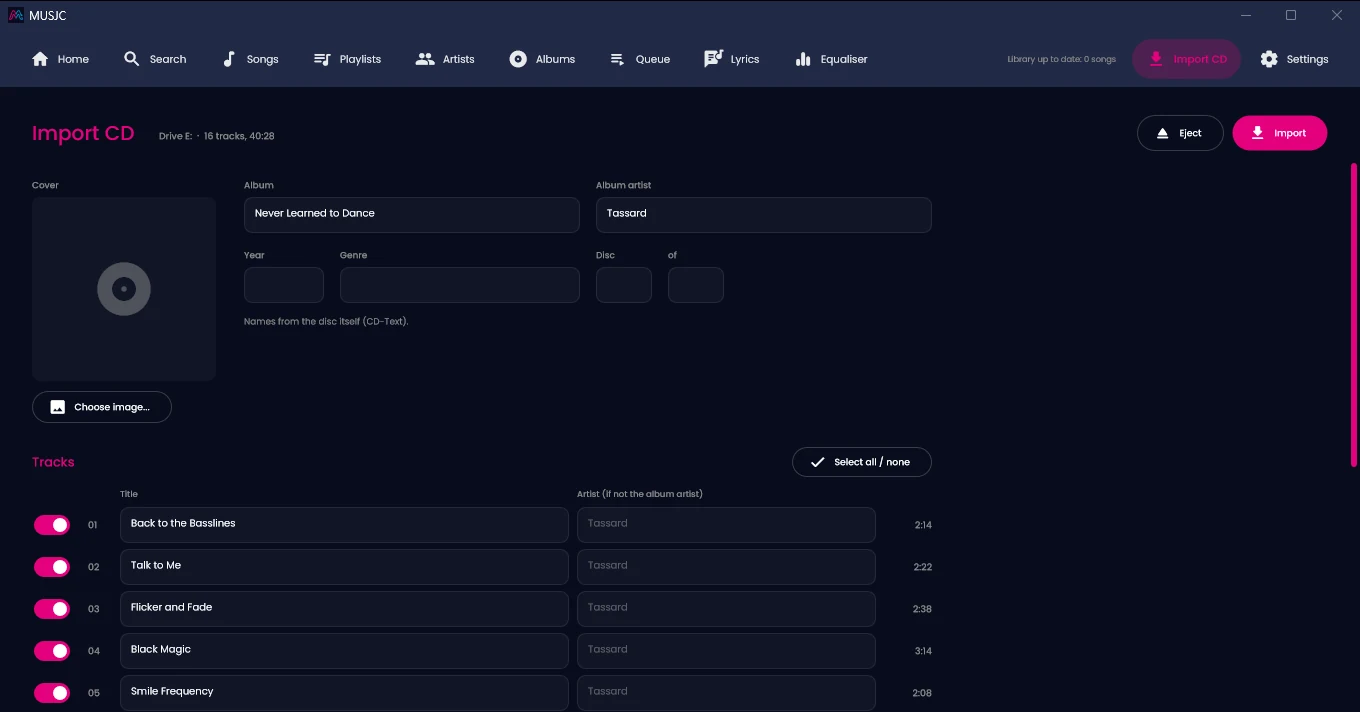
How it works How to rip a CD on Windows 11 with MUSJC
Download and open MUSJC
It's one file. There's nothing to install, and you don't need admin rights.
Put the CD in
Any CD or DVD drive, a USB one included. An Import CD button appears at the top right, next to Settings. With more than one drive, you choose which.
Check the names
The album, artist and track titles come from MusicBrainz or the disc's own CD-Text. Correct anything, or type the names in.
Choose FLAC or AAC
And the folder: it starts in your first music folder. Untick any tracks you don't want.
Press Import
You can carry on using your library while it works. The top bar shows how far it has got, such as "Importing CD: 3 of 12".
Play it
Each track is saved as Album artist\Album\01 Title.flac, with the tags (and the cover, when there is one) inside the file, and it's in your library straight away.
Names Where the names and covers come from
MUSJC works out the CD's exact track layout (its disc ID) and looks it up on MusicBrainz, the free, community-run music database. If there's no exact match, it looks for releases whose track lengths fit and asks you to check the names. Discs burned with their own names (CD-Text) are read too. Your own unreleased CDs won't be on MusicBrainz, so type the names in once and they're written into every file.
Covers come from the Cover Art Archive when MusicBrainz has one, or you can choose your own JPG or PNG.
When MusicBrainz knows a disc is disc 2 of 3, the files are numbered 2-01, 2-02 and so on, and on a compilation each track keeps its own artist.
Only the disc's identifier and track layout go to MusicBrainz, never any audio, plus a request for the cover to the Cover Art Archive, and only while the Import CD page is open with a disc in. The privacy policy has the details.
Formats FLAC or AAC?
FLAC
Lossless: every bit the drive reads goes into the file. The one to choose if you have the space.
AAC (.m4a)
192 kbps, roughly a quarter of the size of FLAC. Plays on iPhones, in iTunes and on most phones.
MUSJC doesn't make MP3, WAV or Apple Lossless files. On Windows N editions, AAC needs Microsoft's Media Feature Pack; FLAC always works.
Read errors Scratches and read errors
If the drive reports a patch it can't read, MUSJC tries again, then a sector at a time. Anything it still can't read becomes silence, and MUSJC tells you which track and how many seconds. Cleaning the disc may help. Some drives quietly smooth over a scratch instead of reporting it, and MUSJC can't tell when that happens.
If the disc comes out or the drive is unplugged, MUSJC stops rather than saving silent tracks, and keeps the ones that finished. It also keeps the PC from going to sleep while it imports.
Honest limits What MUSJC doesn't do
- No AccurateRip check: your rips aren't compared with other people's copies of the same CD.
- No drive read-offset correction, and no read-twice-and-compare mode.
- No MP3, WAV or Apple Lossless output.
- No cue sheets, no rip logs and no CD burning.
- Windows 11 only for now: Windows 10 hasn't been tested yet.
If you're archiving a collection and want verified copies, Exact Audio Copy (free for non-commercial use) and dBpoweramp (paid) are built for that. MUSJC is for getting your CDs into the library you actually play.
Analysis BPM and key for every CD you import
Imported tracks join your MUSJC library like any other song, so background analysis (on unless you switch it off) works out their BPM and key, ready to sort and search. More about BPM and key detection.
Album not found Windows Media Player can't find your CD's names?
Since around Christmas 2025, Windows Media Player hasn't been able to look up CD names on Windows 10 or 11: discs come up as "Album not found", and Microsoft hasn't said why (The Register reported it). You can still type every name in yourself.
MUSJC is a separate, free player that looks CDs up on MusicBrainz instead, reads CD-Text and fetches the cover. It's a music player too, so your CDs end up in the same library as the rest of your music.
Questions Ripping CDs with MUSJC: questions
Is MUSJC free? Do I need an account?
Yes, it's free: no account, no subscription and no trial. Looking up names needs no account either.
Do I need a CD drive? Will a USB one work?
You need a CD or DVD drive. A USB one works; that's what MUSJC was tested with.
Can it rip to MP3?
No. MUSJC rips to FLAC or AAC (.m4a).
FLAC or AAC: which should I choose?
FLAC to keep full quality if you have the space (about 25 MB a song); AAC if space matters more (about 6 MB a song).
Where do the album and track names come from?
MusicBrainz first, by the disc's track layout, then the disc's own CD-Text. Or type your own.
My CD isn't on MusicBrainz (I made it myself). What happens?
If it has CD-Text, the names come from that. If not, type them in once and they're written into every file.
Does it add album art?
Yes, when the Cover Art Archive has a cover for the album. Otherwise choose your own JPG or PNG. Either way it goes inside every file.
Can I rip just some of the tracks?
Yes. Untick the ones you don't want.
Where are the files saved? Can I change the folder?
In your first music folder, as Album artist\Album\01 Title. You can choose another folder; the naming pattern is fixed.
What if I import the same CD twice?
Nothing is overwritten. The second copy is saved as "01 Title (2)".
How long does it take?
It depends on the drive. Our test USB DVD drive ripped tracks at about 7 to 11 times real time, so roughly 6 to 9 minutes for an hour-long album. Progress and speed show as it goes.
Does it check rips against AccurateRip?
No. It retries patches the drive can't read and tells you which track and how much couldn't be read. For verified archive copies, use Exact Audio Copy or dBpoweramp.
Does it work on Windows 10?
It hasn't been tested on Windows 10 yet. It's built and tested for Windows 11, 64-bit.
Do I need admin rights or drivers?
No. MUSJC uses Windows' own CD drive support.
Get MUSJC Download MUSJC
Free, for Windows. The CD ripper is part of the player.
Windows
Windows 11, 64-bit (x64). One self-contained file — no installer and no runtimes to install. Windows 10 hasn’t been tested yet.
Importing CDs needs a CD or DVD drive. As a new app, Windows SmartScreen may ask you to confirm the first time you open it (More info → Run anyway). More about MUSJC →